What to do if you have Wi-Fi or Bluetooth connection problems?
Here you will find efficient measures for smooth Wi-Fi and Bluetooth connectivity
Are you still unsure or do you need further help? We are happy to help you. Simply contact us at support@scewo.com, or contact one of our partners.
You can find instructions on how to connect the Scewo BRO app to your BRO here: How do I connect my BRO with the Scewo app?.
First steps: If you have problems with the Wi-Fi or Bluetooth connection of your BRO with the Scewo app, proceed as follows:
| Restart the Scewo App Close the Scewo app and open it again.
| |||
| Restart BRO Turn off your BRO using the main switch on the back. Wait a minute and then turn it back on. | |||


Further instructions: If the Wi-Fi or Bluetooth connection still does not work, follow these steps:
| Uninstall the Scewo App on your mobile phone Delete/uninstall the Scewo app on your mobile phone. | ||||||||||||||||||||||||||||||||||||||||||||||||
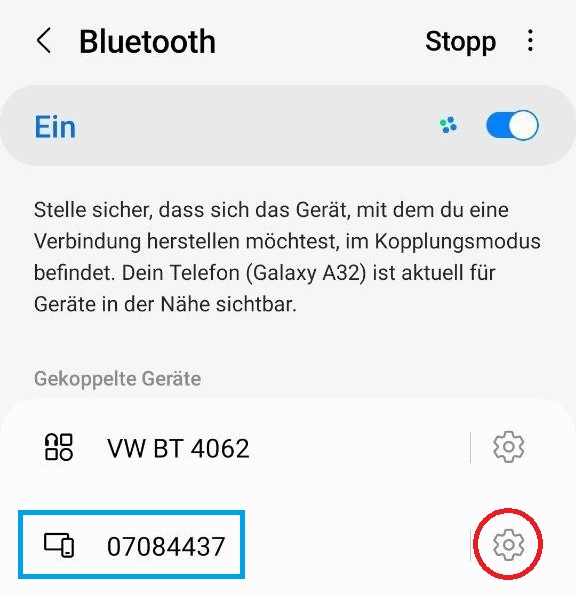
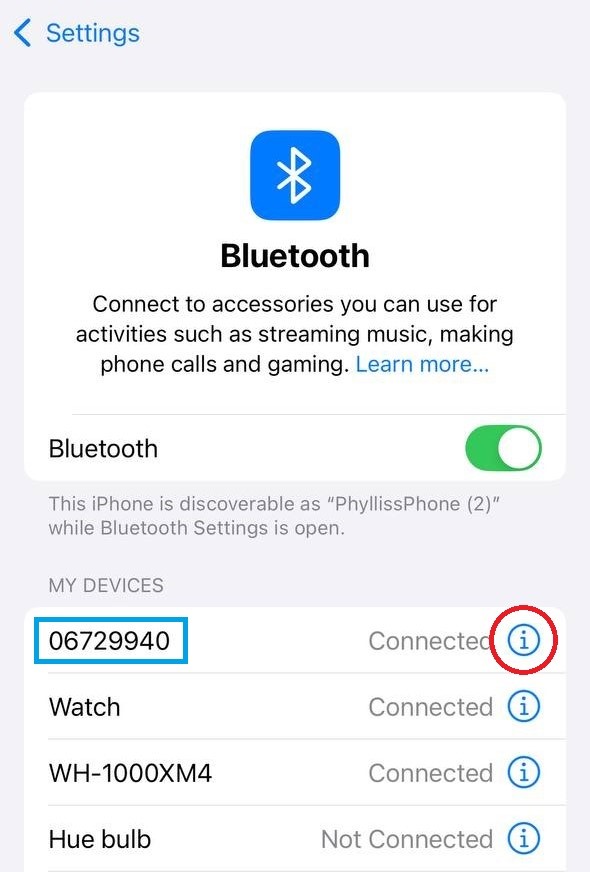
| Remove BRO from the list of Bluetooth devices Navigate to your mobile phone's Bluetooth settings. Look for the BRO, which is displayed as an 8-digit number starting with "06..." or "07..." (see blue rectangle).[a] This device must be removed. The wording used here may vary depending on the manufacturer and version: ignore, unpair, or forget.
|  |  | ||||||||||||||||||||||||||||||||||||||||||||||
| Restart the mobile phone Turn off the mobile phone completely and restart it. | ||||||||||||||||||||||||||||||||||||||||||||||||
| Restart BRO Turn off your BRO using the main switch on the back. Wait a minute and then turn it back on. | ||||||||||||||||||||||||||||||||||||||||||||||||
| Reinstall Scewo app on your mobile phone Install the Scewo app on your mobile phone as usual. This will also ensure that the latest version is installed. | ||||||||||||||||||||||||||||||||||||||||||||||||
| Reconnect your mobile phone to BRO via Wi-Fi and Bluetooth If you have forgotten your WLAN password and cannot find the password card, contact support@scewo.com. | ||||||||||||||||||||||||||||||||||||||||||||||||
[a] Please note: This number may be different for older devices. | |||||||||||||||||||||||||||||||||||||||||||||||||