Control Panel
The control panel is used to switch the wheelchair on and off and to select the various modes and functions. The following sections explain how you can switch between different modes and settings.
The control panel can also display various errors and warnings. These indications are explained directly in the respective chapter. See also Error Messages and Troubleshooting.
Do Not Lean on the Control panel
Never lean on the Control panel. It could break off and you could injure yourself.
The following principles were followed in the design of the control panel:
Red icon: Error or urgent warning
Orange icon: Warning or user action required
Modes or settings that are currently unavailable are shown greyed out. There may be a note explaining why the mode is currently unavailable.
Actuators (e.g. Seat lift) only move over longer distances as long as the user is deflecting the joystick or pressing a corresponding button. This allows the user to stop the movement at any time if a component or body part becomes trapped.
The standby button stops the movement of all motors at any time and can also be used as an emergency stop in Drive Mode.
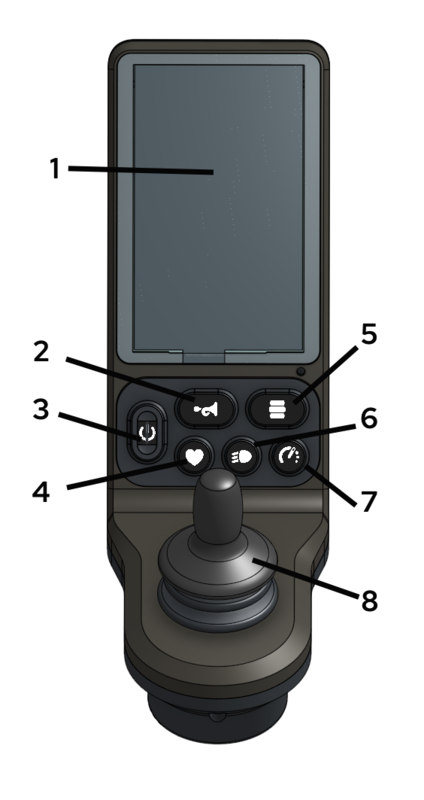 |
The control panel consists of the following parts and buttons:
Display
Horn
Standby
Favourite (freely assignable)
Light
Menu
Driving profile
Joystick
The joystick knob can be replaced with various other shapes. The knob must be suitable for a shaft with a diameter of 1/4 inch (6.35 mm). You can also find suitable knobs in our online shop.