Leg support
Changing the Angle of the Leg support
Depending on the version, the angle can be adjusted electrically. To do this, use the adjustment options on the screen.
Adjusting the Length of the Leg support
The length of the Leg supports can be adjusted mechanically. The length for the left and right lower leg can be set separately. To do this, proceed as follows:
Coarse adjustment (rear of the Leg support):
Loosen the two screws
Set the desired height within the end stops.
Tighten the two screws again
Fine adjustment (front):
Loosen the two screws on the side to be adjusted
Set the desired height within the end stops.
Tighten the two screws again.
Repeat for the other side.
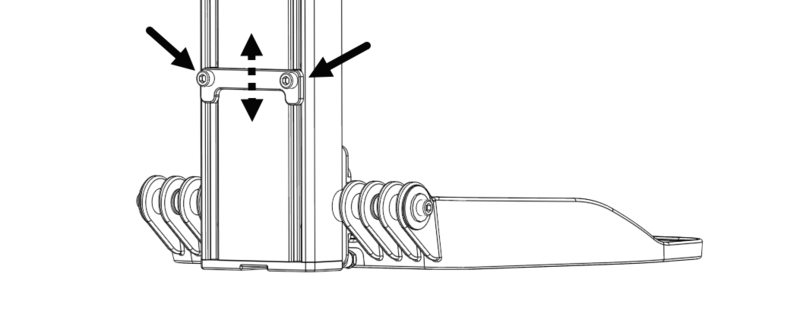 (a) Coarse length adjustment (rear) | 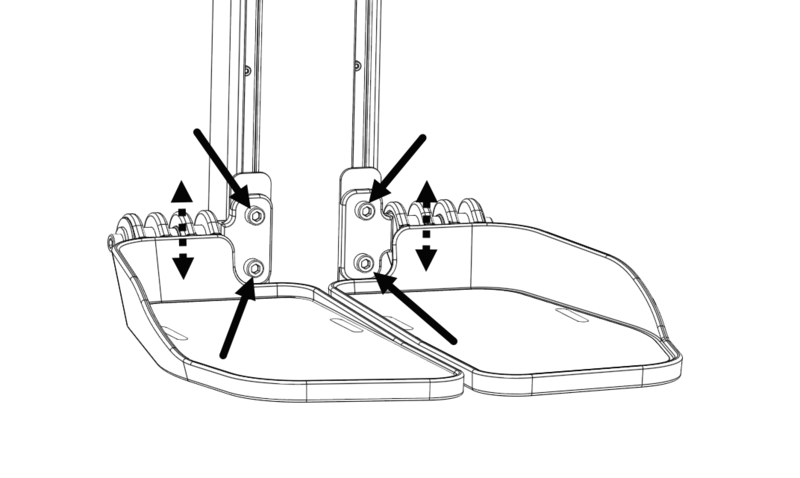 (b) Fine length adjustment (front) |
Length Compensation Leg support
The Leg supports can optionally be equipped with mechanical length compensation. This reduces shear forces when adjusting the angle of the Leg supports, and the user's positioning can be optimally maintained.
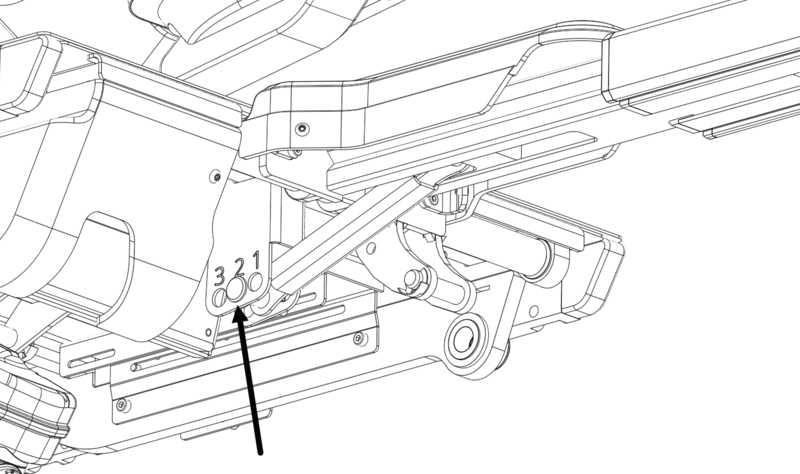
For an optimal fit, the length compensation can be adapted to the thickness of the seat cushion. There are 3 levels for this (the required setting may vary depending on exact body proportions):
Level 1: seat cushion thickness up to 50 mm
Level 2: seat cushion thickness up to 75 mm
Level 3: seat cushion thickness > 75 mm
To change the level, proceed as follows:
Move the Leg support all the way up
Remove the pin's locking clip
Move the pin to the corresponding position.
Secure the pin again.
 |