Arm supports
The following chapter shows the ways in which the Arm support can be adjusted mechanically.
Adjusting the Angle of the Arm support
The angle of the Arm support can also be adjusted separately on the left and right. To change the angle, proceed as follows:
Remove the rear cover of the Back support, see Remove the cover of the Back support
Loosen nut (1) (see Figure 18, “Adjusting the angle of the Arm support”, No. 1).
Turn screw (2) from below until the desired angle of the Arm support is reached. Lifting the Arm support slightly can make the adjustment easier.
Tighten nut (1) again.
Refit the cover.
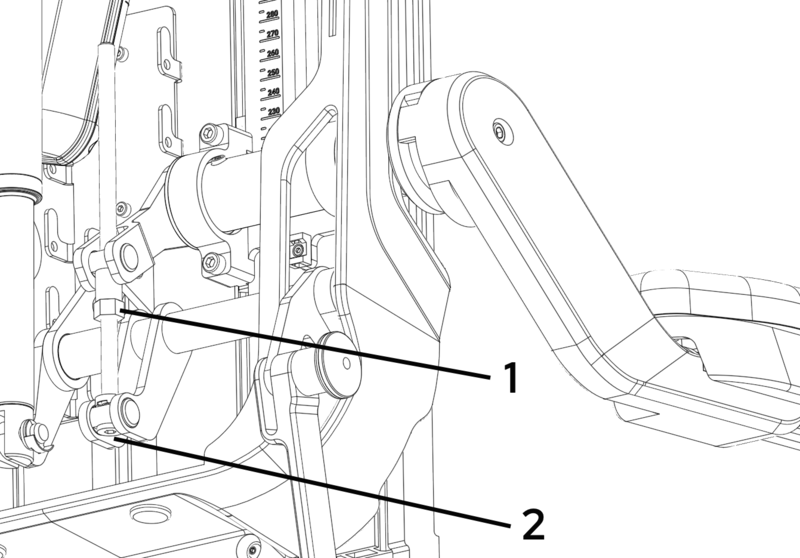 |
Changing the Width of the Arm support
The distance between the Arm supports can be adjusted individually on the left and right. To do this, proceed as follows:
Loosen the width adjustment screw (see Figure 19, “Screw for adjusting the width of the Arm support”).
Pull out the Arm support until the desired width is reached. Observe the "Max" marking for the width!
Tighten the screw again.
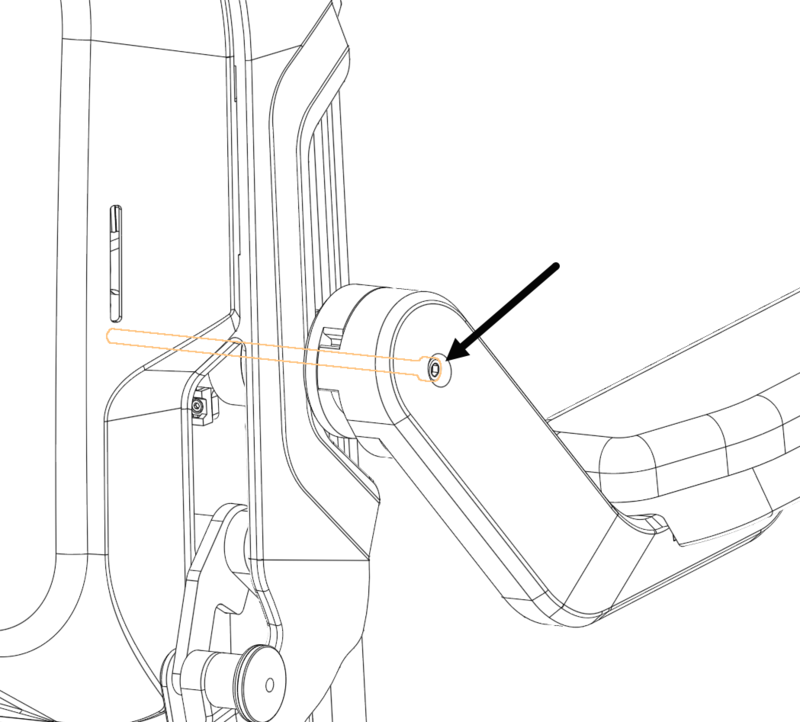 |
Changing the Length of the Arm support
The length of the Arm support can be adapted in three versions. To do this, contact your Partner, who can fit the corresponding part.